skip to Main Content

Gigaset Pro Introduces Maxwell 10 Android Tablet & Phone

Gigaset Pro MaxwellEarlier this week Gigaset extended their Gigaset Pro line by adding a new 10” Android tablet they call Maxwell. I must say that at first glance the device looks VERY nice.

As just an Android tablet Maxwell is a little unremarkable. The display is 1280 x 800 pixels. It runs Android 4.2.2, aka Jelly Bean, which is a little old on the eve of widespread Lollipop rollout.

What makes Maxwell stand out from the crowded tablet marketplace are the customizations intended to make it a communication centerpiece. These include;

  • Ethernet interface with POE support
  • Ethernet pass-through
  • Wired handset (RJ9)
  • EHS & DHSG connectivity
  • Bluetooth & wired headset connectivity (RJ9)
  • Audio augmented by a large speaker in its back
  • Built-in DECT base radio
  • Optional DECT handset
  • Desk stand
  • Wall mount capability
  • Gigaset Pro telephone app
  • Micro-HDMI output for a larger monitor
  • 2x USB host ports (supports external camera, keyboard, mouse, etc)

Color me curious about this tablet. I’d simply love to lay hands on one. I suspect that won’t happen since their Gigaset Pro line has not been offered in North America. The only thing that made it to these shores was the Gigaset DX800A. Lacking for a well-developed retail channel I don’t think that it did very well.

Read More

Revisiting The SlimPort Output Of Android Devices

HDMI-SplitterA few days back I received a G+ IM from someone who had discovered my description of how to use an HDMI splitter to make the output of an Android tablet more useful. He posed a question that I think is worth sharing. He asked the following;

Dear Michael,

I just read your article about capturing video from a Nexus 7 and I have a question about that if you do not mind.

I bought a Nexus 7 (2013) to be able to give presentations and show short movies in my classroom. The thing is that most projectors still have only a VGA socket. I have a cable Slimport=>HDMI and it works perfectly well.

I also have a cable HDMI=>VGA but it does not work and I suspect it is because of the HDCP. I was wondering if the splitter and HDCP stripper you used could work in my case. If yes that would be great and would literally save my classes.

Thank your for your time and sorry again to bother you with that.

Thibaut Bailly

To begin, as a blogger, I welcome questions from readers. For the most part people blog because the want to share what they’ve discovered. As a non-professional blogger I may not always respond immediately, but I try to respond to every comment and question.

Read More

Chromecast Tricks

As a participant in the Android ecosystem and committed early-adopter I was quick to order a Chromecast when they were introduced in 2013. Sadly, our older Sharp Aquos HDTV lacked the input switching to make the little dongle convenient in my intended application. Since then I’ve struggled to find a use for the little guy.
This week I stumbled upon a new use case for the Chromecast…digital signage! This was inspired by a couple of apps for Chromecast I found in the Play store; Big Tweets and Countdown.

Both of these apps would have been tremendously useful in my past life. I surely would have used them in staging trade show presentations.

Big Tweets cycles through a tweet stream with a selection of nice graphic themes. It even allows custom themes for the graphically handy. Just plug it into a monitor or HDTV and set it up via an Android device. No keyboard or mouse. Low power. Reliable. Lovely.

Read More

Ubiquiti Networks Announces New VoIP Hardware

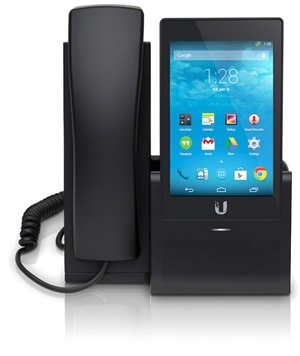
uvp-feature-hd-touchscreen-300Several folks have reported that yesterday Ubiquiti Networks sent out a marketing email announcing a new line of VoIP products under their UniFi brand. A quick look at the information offered online reveals some very nice looking hardware. Very nice indeed.

The hardware includes a trio of handsets; UVP, UVP-Pro and UVP-Executive. All are Android powered, reported run Kit Kat (v4.4.2) on dual core Cortex A9 processor clocked at 1.2 GHz. They all sport 1 GB of RAM and 4 GB of local storage.

The entry-level UVP model is a bit feature constrained in order to hit a $149 MSRP.

The UVP and UVP-Pro are more-or-less mobile phone-ish in that they feature a 5” capacitive touch screen resolving 640 x 960 pixels. The UVP-Executive is more tablet-like, with a  7” capacitive touch screen resolving 1024 x 600 pixels.

Audio codec support includes; G.722, Speex, iLBC, PCMU,PCMA and GSM. Thus they are capable of wideband telephony.

Read More

Our DoorBot has Been Decommissioned: Part 3

DoorBot-Looking-Left.jpgFor the several weeks we’ve had the new “Extended Range” Doorbot installed in place of the original device. The only apparent difference between the two is the addition of a short external antenna to enhance the Wifi connectivity.

Happily, the new unit does seem to stay better connected to our WLAN. In the past I was not comfortable evaluating the behavior of the Doorbot+client application given the questionable connectivity. At present the network connection seems sufficient to examine the behavior of the system as a whole.

I have the DoorBot client application installed on a variety of devices:

  • Nexus 4 Android mobile phone (Me)
  • Nexus 5 Android mobile phone  (Mrs)
  • Nexus 7 Tablet (2013)
  • 4th generation iPod Touch
  • iPad with Retina display

The fact that I’m using so many devices may be a little unusual, but I would expect that many families will use 2-3 devices, most likely a couple of cell phones (his & hers) and a tablet. Although a family with kids may well have more than this.

Read More
Back To Top