


“transcribing interview and can hear myself sipping coffee. That must come through loud and clear on speakerphone too.”
The inappropriate, or at least unfortunate use of speakerphones being a pet peeve of mine I could not help but respond, recommending the use of a good headset…as I’ve done many times previously.
Jon further went on to inquire about how he might easily record a call when using a headset with his using a Polycom Soundpoint IP335?
He further asserts that:
“…you would think it should be a lot easier with an Internet-based phone, but it’s not.”
That started me wondering how many people find call recording to be troublesome? People in companies with on-site PBX systems may have such capability presented by those systems. SOHO users may need other options.
There certainly are a lot of options. I thought I’d offer a few ideas that come to mind.


My favorite technique for call recording is to use the on-phone call recording offered by some of the better models of Polycom SIP phones. The Soundpoint IP650, IP670, VVX-1500 and VVX-500 all offer call recording to a USB flash memory stick. This feature is supremely convenient as only one or two keypresses engage the recording function.
Further, the calls are recorded to uncompressed wave file on the memory stick. That makes then optimal quality for editing after the fact. When I need to post-produce a call for use in a podcast the wav file is perfect to processing by The Levelator, ensuring perfect levels before it gets compressed to MP3 for delivery.
The call recording function is only offered on models that have a USB port. On the Soundpoint IP range it’s an optional part of the “Polycom Productivity Suite” which adds about $10 to the cost of the phone. It’s a core feature of the more costly VVX series.


I certainly understand that not everyone can justify paying for a high-end phone to record the occasional call, but it remains my preferred approach, and may be worth considering in some cases.
2. Conference Service
Most good conference services provide call recording. The ZipDX conference bridge that we use for VUC calls records to an MP3 file which we can later download for post-production. ZipDX is admittedly a premium conference service, but I’m sure that others also have this feature.
3. Ad Hoc Conferencing Via Bridge
It happens that the private conference bridge we pay for as part of our OnSIP account doesn’t have the management tools of ZipDX. Nor does it have call recording capability. That doesn’t mean that we can’t easily record those conference calls.
When we need to record calls on the OnSIP bridge we simply use a soft phone like Bria or Blink to add one extra participant to the call. Once the soft phone is joined to the call I mute it locally and engage it’s call record function. Most decent soft phones can record a call.
4. Ad Hoc Conferencing Via Phone
If you don’t have access to a conference bridge you can still use a soft phone to record calls to/from your SIP desk phone. Just invoke a three-way conference on your desk phone, bridging the call to a soft phone for recording.


Call this the Radio Shack technique. You can still use a suction cup induction coil to pickup call audio on a handset, taking the audio feed to the microphone input of a small recorder, like the Zoom H2.
6. New Skool: Wireshark
For those who are a little geekier you can use Wireshark to capture the stream of the voip call on your network. Wireshark running on a spare computer makes it pretty easy to capture call audio and save it to disk as a file.
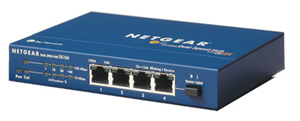

Unlike a switch all ports on a hub can see all traffic to all the other ports on the hub. With the phone and the Wireshark host connected to the hub the network traffic to the phone is exposed to the computer running Wireshark. I keep an old 10/100 megabit hub on hand for just such occasions.
There have been days when I though that I could put up an old PC running Wireshark and capture all SIP traffic on my network, all the time. Tempting as that might be I’ve never actually acted upon that impulse.
There you have it, a handful of approaches to call recording for the SOHO user. I’m sure that there are many other possible approaches as well.
Be forewarned, recording a phone call has legal implications that you need to investigate. Even so, call recording is relatively commonplace in business. There’s no reason why it can’t also be convenient.